
Vehicle Fleet Management in Excel: Free Template and Comprehensive Guide
Managing a vehicle fleet often starts with a spreadsheet. Excel is accessible, familiar, and flexible enough to centralize the initial data: license plate numbers, drivers, contracts, mileage, insurance, maintenance, and expenses.
This is a logical starting point when the number of assets is limited. But to be useful, the file must be structured, shared, and updated regularly. Our template helps you get started.
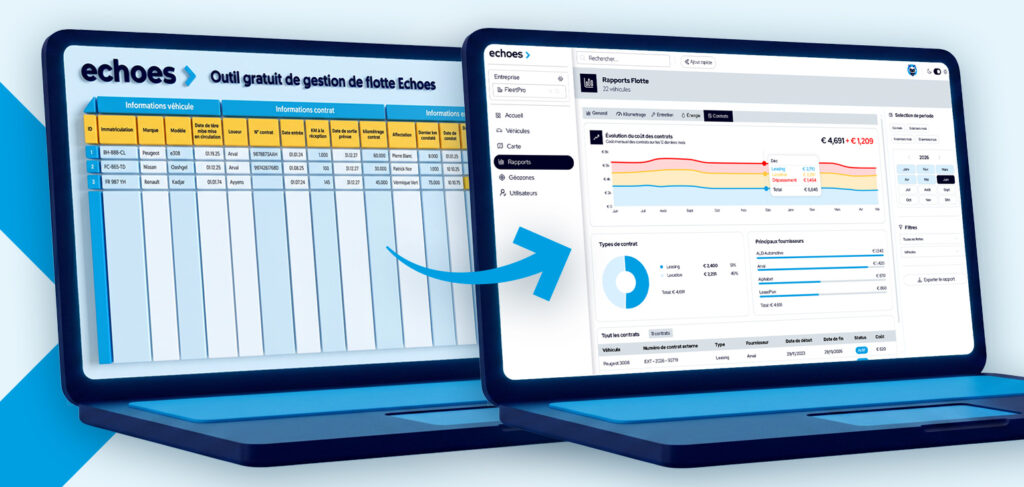
Download our free Excel template for managing your vehicle fleet to track your fleet, due dates, costs, and key metrics. This guide also explains when Excel reaches its limits and when cloud-based software can take over.
In the model:
- A clear inventory of your vehicles
- Excel Fleet Mileage Tracking
- Tracking of Lease Agreements
- Set up due date alerts
- An Excel Fleet Management Dashboard
How to Use an Excel Fleet Management Spreadsheet Effectively
Centralize Your Fleet Data
A useful file should become your go-to reference. Start by gathering the information that is currently scattered across emails, lease documents, invoices, personal spreadsheets, and communications with drivers.
In the “Fleet Management” tab, enter the permanent details: license plate number, make, model, contract, driver, and date of first registration.
This step makes your Excel fleet management more reliable and helps answer everyday questions: Which vehicles need to be replaced? Which driver uses which vehicle? Which contract needs to be renegotiated?
Keep Track of Deadlines
To track your mileage and contracts, you need to combine two pieces of basic information: the start date and the mileage at the start of the contract.
For each due date, add:
- The service provider in question
- The most recent recorded mileage
- The date of the finding
With simple built-in formulas, you can calculate the estimated date when the mileage limit will be exceeded and highlight urgent cases.
The benefit is immediate: you reduce the risk of exceeding the mileage limit specified in the contract and can swap out vehicles between high-mileage and low-mileage drivers.
Calculate and Monitor Your Fleet Costs
A vehicle costs more than just its lease or purchase price. To get a more realistic picture, consider the total cost of ownership, also known as TCO.
In your table, group the following:
- Rent, depreciation, or financing
- Fuel or electricity
- Maintenance, Repairs, and Tires
- Insurance
- Taxes and Administrative Fees
- Tolls, parking, and other variable expenses
The basic calculation is simple:
Monthly TCO = monthly fixed costs + variable costs for the month
You can then calculate:
- Total cost per vehicle
- The monthly cost per vehicle
- Cost per kilometer
- Cost by energy source or vehicle category
The goal is to identify trends: an expensive vehicle, unusual fuel consumption, a growing number of repairs, or an unsuitable insurance policy.
Automate alerts using formulas and conditional formatting
Excel can do much more than just record rows. Add tabs and use formulas to automate repetitive calculations, and use visual rules to identify priorities.
Here are a few useful examples:
- =TODAY()-[last update date] to check how recent a record is
- =[due date]-TODAY() to find the number of days remaining
- =[total cost]/[mileage] to calculate the cost per mile
A drop-down list to standardize statuses and minimize data entry errors
Keep the dashboard simple: active vehicles, payments due within 30 days, expenses, average cost, and vehicles without a recent statement.
The 5 Limitations of Excel for Fleet Management
Excel is useful, but its effectiveness depends entirely on the data you you enter. Here the the most common.
1. No real-time data
Imagine that a vehicle exceeds its contractual mileage, that the fuel level drops, or that a mechanical warning appears while it’s on the road. Your spreadsheet won’t know about it until someone retrieves and enters the information.
An Excel file is, therefore, a snapshot of the past. Connected software, on the other hand, can automatically retrieve certain data from the vehicle—depending on compatible makes and models—such as mileage, location, charge status, fuel consumption, or technical alerts.
2. Human error and competing versions
"Flotte_2026_final_v7.xlsx" is rarely a reliable source. When multiple people edit the same file, a value may be overwritten, a formula deleted, or information updated in the wrong version.
A concrete example: The administrative manager changes a return date while a manager updates the mileage. The file saved last may only reflect some of the changes. On a large scale, these discrepancies lead to decisions being made based on incomplete data.
3. No automatic connection with your partners
Excel does not automatically update itself based on data from your rental companies, insurers, repair shops, ticketing systems, accounting tools, or manufacturer platforms. The administrator must open multiple portals, export files, and then manually reconcile the information.
This process may work for a few vehicles. It quickly becomes time-consuming as the number of suppliers, locations, or vehicles increases.
4. Maintenance that is solely scheduled, rarely predictive
A spreadsheet can remind you that a service is theoretically scheduled for a specific date. It does not automatically detect when the check engine light comes on, a technical issue arises, or a discrepancy between the scheduled maintenance and the vehicle’s actual usage.
The result: You manage administrative deadlines, but you don’t always have the information you need to anticipate downtime. A connected maintenance solution can help you make the most of available alerts and take the right actions at the right time.
5. A Difficult Scaling Process
There is no universal threshold. A fleet of 15 vehicles, all located at a single site and managed by a single person, can be effectively tracked using Excel. Conversely, a fleet of 20 to 30 vehicles spread across multiple sites, involving multiple makes, or shared among several people can already make the system unreliable.
The warning signs are clear: the file takes a long time to maintain, the data is out of date, teams are debating which is the “right version,” and deadlines are being missed because they’re identified too late.
When Should You Switch from Excel to Fleet Management Software?
The right time isn't necessarily related to the number of vehicles. It comes when manual management starts to create more risks than value.
Switch to a dedicated solution when:
- You spend several hours a month consolidating data
- You need to follow up with drivers regularly to get their mileage reports
- You find out about deadlines or missed deadlines too late
- You manage multiple brands, sites, contracts, or service providers
- Do you need an up-to-date overview of fuel consumption, maintenance, mileage, or activity?
- Your teams need to share reliable data with appropriate access rights
Echoes helps businesses move beyond spreadsheets with a connected fleet management platform. For compatible vehicles, manufacturer data can be automatically imported into a single interface without the need for an additional device. This allows you to centralize your information, track actual mileage, plan for maintenance, and analyze costs with less manual data entry.
Discover our solution for fleet management and mileage tracking, or check out our guide to fleet management software.
Is your fleet too large for Excel to handle?
You have already a file, but it takes too long and lacks reliability or doesn’t provide enough visibility that you need need ?
FAQ: Vehicle Fleet Management in Excel
What free software can I use to manage my vehicle fleet?
For a small fleet, a model free template can be a solution for effective effective. It allows centralize essential : vehicles, drivers, maintenance, mileage, costs and deadlines. To as as the needs grow, a dedicated dedicated provides greater automation, collaboration, and up-to-date up-to-date.
How do you create a fleet tracking spreadsheet in Excel?
Create first a Inventory with an unique for each vehicle. Then add then add dedicated for maintenance, mileage, costs and schedules. Link the information with this ID, use the drop-down drop-down to limit errors and create a dashboard that displays the key metrics : vehicles in service, expenditures, alerts and due dates to come.
How many vehicles do you need before you need fleet management software?
He There single number. Excel may be sufficient when the fleet is reduced, it is complex and followed by a single person. A piece of becomes relevant as soon as it several users, websites, brands, contracts or service providers must work with the same data, or when you need need to automate the mileage, maintenance, and alerts.
How do you calculate the TCO of your fleet using Excel?
Add the fixed fixed and variable costs for each vehicle to a given . Include in particular the rent or depreciation, insurance, energy, maintenance, tires, taxes, and other expenses. Divide then this total by the number of kilometers traveled to reach a cost per kilometer. Compare the results between vehicles of the same category to identify the differences.
Can an Excel template be used to track preventive maintenance?
Yes, provided that enter the dates and mileage of the most recent maintenance visits, and to configure the upcoming due dates. The implementation conditional conditional can indicate the upcoming upcoming or delayed overdue. However, Excel does not receive not automatically the technical technical available as of the connected connected.
Download the template and get organized with your fleet management today
The Excel template helps you get started with a basic overview of your fleet and your deadlines. Download it, customize it for your organization, and use it as a basis for assessing your needs.
When your fleet needs up-to-date data, less manual data entry, and more automation, Echoes can help you make the transition to connected fleet management.